
A Day One folder template for every client engagement
Every one of my product management and product marketing engagements starts the same way. Before the kickoff deck, before a first deliverable, I build one folder system inside the client’s enterprise cloud storage. It’s a Day One task that pays off every day after.
The template lives in my own cloud storage under a main folder called client-projects. With very few exceptions, every active project and every past project lives inside it. I consider it my AI-native filing cabinet: AI assistants can read it without a tour guide, and so can people.
Easy to learn, just as easy to extend
The structure takes minutes to learn and an hour or so to stand up. It’s bidirectionally adaptable, expanding or condensing with ease. Once a client sees it, it tends to spark simplifications to their own filing habits. And when a client already has smart conventions and homegrown innovations in use, the structure absorbs them without friction.
Fluent beyond Claude
Claude is the primary assistant in most of my stacks, and the workspace was built with it in mind: a CLAUDE.md file (Markdown: plain text with simple formatting marks) at the root hands Claude operating context from the first prompt. The workspace speaks other dialects, too. Gemini CLI reads a GEMINI.md file the same way, so a short pointer file at the root gives it the same map. OpenAI’s Codex does likewise with AGENTS.md. ChatGPT, for its part, reaches the files through connected Google Drive and OneDrive accounts.
Spoiler alert: wiring these assistants into the rest of your workspace is far from uniform. Ahem, Gemini, which has no native integrations for ClickUp, Notion or Obsidian. Between CLIs, MCP connections and APIs, every stack plugs in a little differently, so you may need third-party tools, browser extensions or a custom MCP server for a smooth-ish workflow. The good news: the files themselves travel well.
ClickUp Brain searches the connected drive, so dated, descriptive file names do the retrieval work. Notion imports those files as nested pages that mirror the folder tree. And Obsidian, a local Markdown editor and graph viewer, opens the root as a vault with no conversion, since every working file is already .md.
The system at a glance
Five numbered folders and three root files carry the load. The numbers set the reading order. The names say what’s inside.
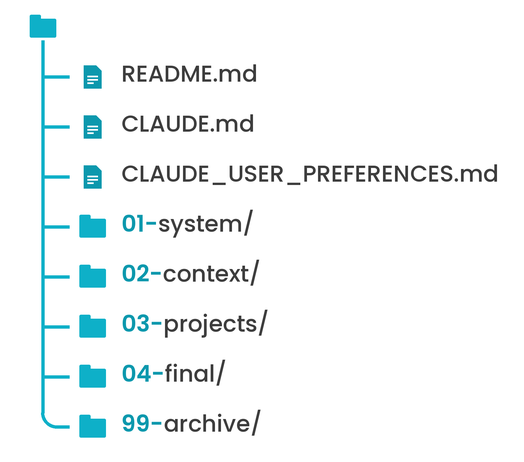
I won't walk through every folder and file here. The detailed map runs long, and parts of it stay in-house. If a specific folder or file piques your interest, reach out and I’ll gladly go deeper.
Naming conventions cheat sheet
Names do half the work. Clear ones let assistants and people find the right file on the first try.
| Rule | Example |
|---|---|
| Lowercase, dashes only: no spaces, underscores, & or + | company-overview/ |
| Files: subject-descriptor-yyyy-mm-dd.ext | x-catalog-2026-10-30.xlsx |
| Revisions default to SemVer: -v0.0.1, -v1.0.2 | pitch-deck-2026-10-30-v2.0.0.pdf |
| Folders get no dates; the files inside carry them | ecosystem-index-updates/ |
| Spell words out; avoid abbreviations | company-foundations, not co-foundations |
| Exempt: workspace control and fixed-name files (SKILL.md, README.md, etc.); client-mandated names and outbound files | [Client Name] 1H 2027 Roadmap.pptx |
Three files hold the root
README.md is the front door for people: the workspace overview, folder logic, naming conventions and a contribution guide.
CLAUDE.md is the operating manual for Claude: architecture, conventions and where team and personal preferences live.
CLAUDE_USER_PREFERENCES.md holds my working preferences. It’s explicitly not team-owned. My quirks stay mine; the team’s rules stay the team’s.
Inside the 01-system/ folder, SYSTEM-RULES.md sets the foundational operating rules. Every session reads it first.
System runs it; context feeds it
01-system/ is procedural. It covers how the workspace runs: rules, a changelog, open items, reusable commands, scheduled tasks and skills that fire when a task matches.
02-context/ is what the workspace knows. It holds stable reference material that many projects draw on and none of them own: the company overview, audience and stakeholders, brand and voice guides, and a references/ library for research, competitor analysis and meeting notes.
In short, one governs behavior; the other supplies knowledge.
Projects: 00 to 04, every time
Every folder in 03-projects/ gets the same five-part skeleton.
00 is the brief, and it’s read first.
01 holds sources.
02 houses notes.
03 has drafts in order.
04 harbors visuals.
The same numbers and the same meaning for every engagement, so anyone on the team, human or AI, knows where to look before opening a single folder.
When a deliverable ships, a dated copy lands in 04-final/, inside a folder mirrored by project name. Drafts stay put; finals stay findable. When an engagement wraps, the whole project moves to 99-archive/ with its skeleton intact and every file still searchable.
Beyond the top drawers
Curious how a specific folder, file or convention would fit your team’s stack? Let's chat. I’m happy to pull out the drawer that matters to you.
